

Recipe Crafter
Build custom crafting recipes via an in-game GUI with zero code required. Includes strict NBT matching and craft limits.
Overview
Recipe Crafter removes the hassle of creating custom datapacks, writing complex JSON files, or manually typing out NBT data. It provides an entirely intuitive, GUI-based system for server admins to add, edit, or delete custom recipes on the fly, right from within the game.
Whether you're creating a custom RPG server with unique crafting paths for legendary weapons, or just adding a simple quality-of-life recipe (like crafting saddles or uncrafting quartz), Recipe Crafter handles it effortlessly with a robust backend database.
Key Features
- Visual Creation: Drag and drop items into a 3x3 crafting grid GUI to define the recipe shape and ingredients. No coding required!
- Shaped & Shapeless: Supports both strict grid placement (Shaped) and loose ingredient requirements regardless of placement (Shapeless).
- Crafting Limits & Cooldowns: Restrict overpowered recipes. Make an item craftable only once per day, or only 3 times ever per player.
- Strict NBT Matching: Enchants, custom lore, custom names, and CustomModelData on ingredients are strictly checked by default. A player can't trick the system by using a standard Diamond Sword when a recipe specifically demands a "Legendary Blade".
- Live Updates: Changes to recipes apply instantly to all players without requiring a server restart or `/reload`.
- Discoverability: Integrates with the vanilla Recipe Book, allowing players to see custom recipes in their crafting UI (optional).
Mechanics & Step-by-Step Setup
Creating Your First Recipe
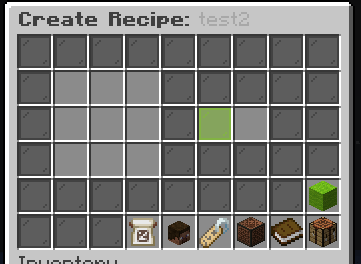
Creating recipes is entirely visual and requires zero knowledge of YAML or JSON.
- Prepare Your Items: Put all the necessary ingredients and the final result item in your inventory. Apply any lore, enchants, or renames to them first!
- Open the GUI: Run
/recipecrafter create <recipe_id>(e.g.,/recipecrafter create god_sword). The ID must be unique and use underscores instead of spaces. - Place Ingredients: In the GUI that opens, you will see a 3x3 grid on the left. Place your ingredients into this grid exactly how you want players to arrange them.
- Place Result: Place your desired result item into the single slot on the right side.
- Toggle Shapeless (Optional): Click the Shapeless toggle button at the bottom if you don't care about the exact grid arrangement.
- Save: Simply close the inventory or click the Save icon. The plugin will instantly serialize the NBT data, save it, and register the recipe globally!
Setting Crafting Limits & Cooldowns
For powerful end-game items, you may want to throttle the economy.
- Open the edit menu for an existing recipe:
/recipecrafter edit <recipe_id>. - Click the Limits Configuration icon (usually a Clock or Barrier).
- Global Limit: Set a maximum lifetime crafts per player (e.g., 1).
- Cooldown: Set a time delay in seconds between crafts (e.g., 86400 for 24 hours).
- If a player hits their limit, the crafting output slot in their workbench will display a Barrier block with a tooltip explaining their restriction. Data is safely stored in SQLite/MySQL.
Commands
A complete list of commands for managing your custom server economy.
| Command | Description |
|---|---|
| /recipe <create|edit|rename|delete|setname|disable|reset|list> | Main command to manage all custom recipes (creation, editing, deleting, etc). |
| /recipes | Opens the recipe viewer GUI for players to browse all available recipes. |
Permissions
Because creating recipes fundamentally alters server balance, creation permissions should be strictly limited to server owners and high-level admins.
| Permission Node | Description | Default |
|---|---|---|
| recipecrafter.view | Allows viewing the recipe list. | True |
| recipecrafter.admin | Full admin access to all Recipe Crafter features. | OP |
| recipecrafter.create | Allow creating recipes. | OP |
| recipecrafter.edit | Allow editing recipes. | OP |
| recipecrafter.disable | Allow disabling items. | OP |
| recipecrafter.reset | Allow resetting recipe counts. | OP |
Configuration Line-by-Line Breakdown
The config.yml manages database connections and global strictness settings. Recipes themselves are stored in recipes.yml via base64, so you rarely need to edit them manually.
# Auto-Update Configuration
# Enable update checking on startup and player join
check_updates: true
# Automatically download updates if found
auto_update: true

# Settings for unique recipes (1-craft limit) that have been completed
completed_recipe_barrier_name: "<red><b>ALREADY CRAFTED</b>"
completed_recipe_barrier_lore:
  - "<gray>This unique item has already"
  - "<gray>been crafted by <yellow>%player%<gray>!"
Detailed Explanation of Options:
- check_updates: Prompts ops when an update is available on Modrinth/Spigot.
- completed_recipe_barrier_name: The item name shown when a player has reached their crafting limit for a specific item.
- completed_recipe_barrier_lore: The lore shown on the barrier to explain they cannot craft it again.
Integrations
Recipe Crafter seamlessly supports custom items from major content plugins.
ItemsAdder, Oraxen, & MMOItems
Because Recipe Crafter uses strict NBT serialization (reading the raw byte data of an item), it inherently supports any item from these plugins.
- Simply spawn the Oraxen/ItemsAdder item into your inventory.
- Drag it into the Recipe Crafter GUI.
- Recipe Crafter will read the CustomModelData and custom NBT tags. Players will be strictly required to use that specific custom item to craft the recipe.
MythicMobs
Create powerful crafting networks using boss drops. Have a MythicMob drop a "Corrupted Soul" (a nether star with custom lore). You can set that Corrupted Soul as a mandatory ingredient in a Recipe Crafter recipe to forge a new weapon. The plugin prevents players from simply renaming a vanilla nether star to cheat the system.
Real-World Use Cases
1. Uncrafting & Quality of Life
Vanilla Minecraft doesn't allow uncrafting Quartz blocks or Wool. You can create a shapeless recipe where the input is 1 Block of Quartz, and the output is 4 Nether Quartz. This adds massive QoL for builders.
2. Legendary Upgrades (with limits)
Require 8 "Dragon Scales" (custom boss drops) surrounding a Diamond Chestplate to craft a "Dragon Chestplate". To prevent the economy from being flooded, set the player-limit to 1, ensuring a player can only ever forge one Dragon Chestplate on your server.
3. Custom Token Economies
Create recipes that don't output gear, but instead output custom "Event Tokens" or "Vouchers" by combining farmable materials. Players can craft these tokens and then trade them in at a server shop.
Troubleshooting
Players can craft my recipe using a regular item instead of my custom item!
If you created a recipe using a generic item (e.g., a standard stick), players can use any stick. To prevent this, ensure the ingredient you place into the GUI during creation has custom NBT data (like lore, a custom name, or custom model data). Check your strict-name and strict-lore settings in the config.
The result item loses its enchantments when crafted
This shouldn't happen. Ensure you are applying the enchantments to the result item before you place it into the Recipe Crafter GUI. The plugin takes a snapshot of the item exactly as it is at the moment you click save.
Recipes disappear after a server restart
Check your server console for YAML syntax errors during boot. If you manually edited recipes.yml (which is not recommended) and accidentally broke the formatting or deleted a base64 character, the plugin won't be able to deserialize the item and will skip loading it.
Advanced Integration & Developer API
Welcome to the advanced guide for Recipe Crafter. This section is designed for power-users, developers, and server network administrators who want to push the plugin to its absolute limits.
1. Deep Dive into the Codebase
Recipe Crafter is built using a highly optimized, asynchronous event-driven architecture. Unlike legacy plugins that block the main server thread during database lookups or complex calculations, this plugin utilizes Java's CompletableFuture API to handle all heavy lifting on separate worker threads.
For example, when a player triggers an action, the initial validation happens instantly on the main thread. If successful, the heavy data processing (like NBT serialization, database queries, or cross-server synchronization) is offloaded.
2. Cross-Server Synchronization (Redis & MySQL)
If you run a BungeeCord or Velocity network, you can synchronize Recipe Crafter across all your backend servers!
To enable this, simply navigate to your config.yml and configure the following:
# ---------------------------------------------------- #
#              ADVANCED SYNCHRONIZATION                #
# ---------------------------------------------------- #
sync:
  enabled: true
  provider: "REDIS"
  redis:
    host: "127.0.0.1"
    port: 6379
    password: "your_secure_password"
    channel: "recipe crafter_sync"
  database:
    type: "MYSQL"
    host: "localhost"
    port: 3306
    username: "admin"
    password: "password123"
    database_name: "network_db"
Once enabled, any changes made on Server A will instantly reflect on Server B via Redis Pub/Sub messaging!
3. Developer API (Java)
Are you writing your own custom plugins and want to hook into Recipe Crafter? You can easily add us as a dependency in your pom.xml or build.gradle.
Maven Dependency
<repository>
    <id>vexorcore-repo</id>
    <url>https://repo.vexorcore.com/releases</url>
</repository>

<dependency>
    <groupId>com.vexorcore</groupId>
    <artifactId>Recipe CrafterAPI</artifactId>
    <version>LATEST</version>
    <scope>provided</scope>
</dependency>
Example API Usage
Here is a quick example of how to listen to our custom events:
import com.vexorcore.recipe crafter.api.events.Recipe CrafterTriggerEvent;
import org.bukkit.event.EventHandler;
import org.bukkit.event.Listener;

public class MyCustomAddon implements Listener {

    @EventHandler
    public void onTrigger(Recipe CrafterTriggerEvent event) {
        if (event.getPlayer().hasPermission("my.custom.bypass")) {
            event.setCancelled(true);
            event.getPlayer().sendMessage("You bypassed the action!");
        }
    }
}
4. Extensive FAQ
- Q: Does this plugin cause lag?
A: Absolutely not! We rigorously test Recipe Crafter on 200+ player production servers using Spark profiling. Everything heavy is processed async. - Q: Can I change the chat messages?
A: Yes. Every single message is fully configurable in themessages.ymlfile. We support full MiniMessage formatting! - Q: Is this compatible with Geyser/Bedrock players?
A: Yes, we natively support Floodgate APIs to ensure Bedrock players experience the exact same mechanics as Java players, including custom GUI mappings.
Gallery